
macOS App Icon Generator: Every Mac Icon Size from One Prompt
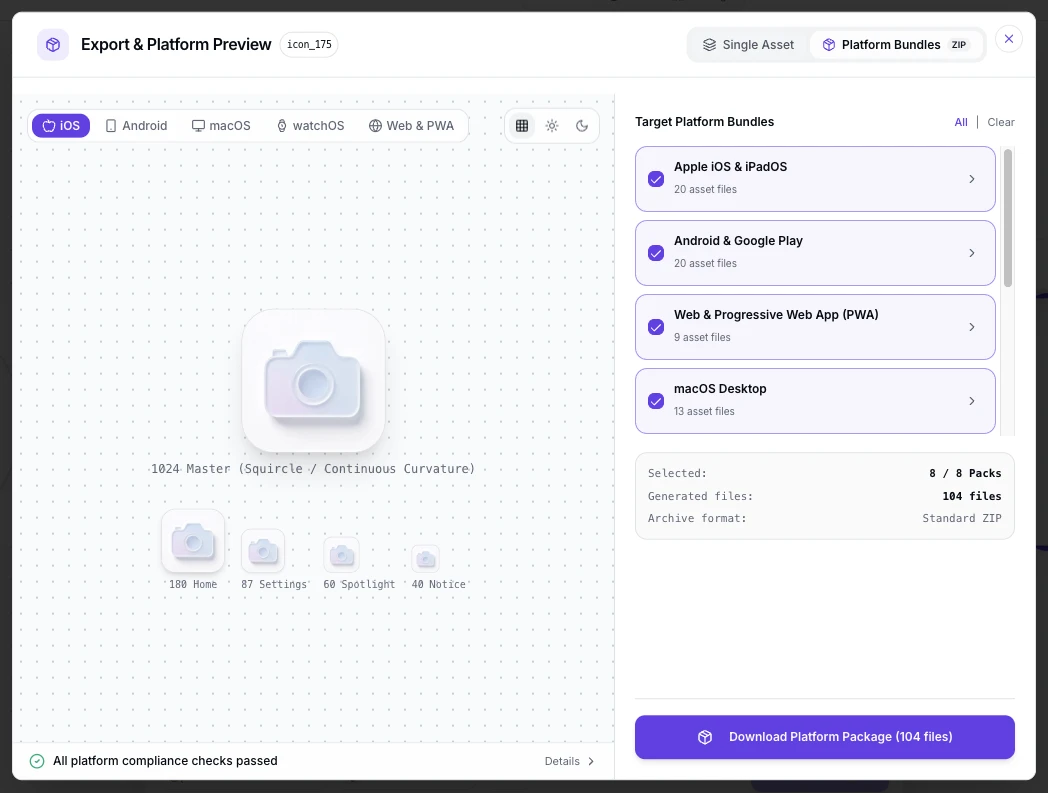
A Mac app icon is a family of files, not one upload. The Xcode asset catalog expects every size from 16px to 1024px at 1x and 2x, and macOS wants the rounded-square shape drawn inside the artwork itself. Describe your mark once, generate the 1024 master, and export the ready-made AppIcon.appiconset in one pass.
Mac App Icon Examples
Icons generated for Mac launches: rounded-square marks in flat, glass and 3D styles that stay readable from the 1024px master down to the 16px entries the system keeps for small Finder views.


What Is a macOS App Icon Generator?
Most tools that rank for Mac icons assume the artwork already exists: Apple's Icon Composer layers a finished design, and Figma templates rescale a square you drew elsewhere. A macOS app icon generator starts earlier, at the sentence. You describe the mark, the generator draws the 1024x1024 master, and the export step cuts the full AppIcon.appiconset the catalog needs: ten PNG entries from 16px to 1024px plus the Contents.json that binds them. Because the first render is rarely the final one, each icon lives on the infinite canvas as a node you can branch from: rework the prompt, compare Dock-size previews side by side, and keep every iteration linked to its origin before exporting the set.
Visual Lineage Tree
Branch one mark into weight, color and lighting variants, then trace every Mac icon iteration back to the prompt that produced it.
Built-in Post-Processing
One-click background cutout and solid color fills, so small-size entries keep a clean silhouette without opening another editor.
Shape-Aware Export
The macOS rounded square is baked in at export with the corner radius Apple's template uses, while the master stays a full square.
Mac App Icon Prompt Examples
Copy any of these into the generator, then edit the subject, style and color words to fit your app. A strong Mac icon prompt states three things: the subject and how it sits inside the rounded square, the style and palette, and that the mark must stay readable at the small Dock and Finder sizes.
Minimal utility mark
macOS app icon, minimal compass glyph centered inside a soft violet rounded square, calm gradient background, thick silhouette readable at 16 px, flat style, no text
Glass depth for a design tool
macOS app icon, frosted glass layers around a pencil tip, cool blue palette, soft studio light, rounded-square silhouette with about 22.5% corner radius, glossy 3D style
Dark mode friendly developer tool
macOS app icon, terminal caret mark on a deep charcoal rounded square, single mint accent, thick shape that survives 32 px in Finder, flat modern style
How to Make a macOS App Icon in 3 Steps
From one sentence to the AppIcon.appiconset your Xcode project compiles, with no image editor open.
- 1
Describe the icon
Write one sentence covering subject, style and colors, like "a flat gauge mark, deep green on cream, macOS app icon for a budgeting app". Name the rounded square in the prompt so the shape lands in the artwork, because macOS will not add it for you.
- 2
Generate the 1024 master, then check it small
Generate at 1024x1024, then preview the mark at 128 px, 64 px and 32 px before judging it. Mac icons spend their lives in the Dock and Finder sidebars, not at full size, so the small previews are the real review.
- 3
Export the full asset set
Export the AppIcon.appiconset with every entry from 16px to 1024px at 1x and 2x, plus the Contents.json. The table below lists what each macOS surface expects.
macOS App Icon Sizes and Format Specs
The Mac asks for more icon files than any other Apple platform, so the numbers come first. These are the current requirements.
| Surface | What the surface needs | Format rules | What happens next |
|---|---|---|---|
| AppIcon.appiconset in Xcode | Ten PNG entries: 16, 32, 64, 128, 256, 512 and 1024 px, covering 1x and 2x | macOS cannot derive the set from one 1024 file: the single-size workflow Apple added for iOS in Xcode 14 does not apply to Mac catalogs, so every entry ships with a Contents.json | Xcode compiles the catalog into the app bundle at build time |
| Dock, Finder and system surfaces | 16 to 256 px entries carry almost all daily rendering | The Dock shows icons up to 128 pt, Finder lists and sidebars sit far below that, and the 1024 entry only appears in Finder views larger than 264 pt | Small sizes dominate real usage, so the mark must read at 32 px before anything else |
| .icns for non-catalog apps | One file wrapping the same size family, for apps outside an Xcode asset catalog | Build it from the PNG set with iconutil: iconutil -c icns AppIcon.iconset | Electron, Tauri and NSApplication setIcon paths read the .icns or the 1024 PNG |
| Mac App Store listing | One 1024x1024 marketing icon uploaded in App Store Connect | PNG with the rounded square already in the artwork; solid background, no baked-in text effects required by the store | The product page and search results show it beside the app name |
Specs follow Apple Developer guidance on configuring macOS app icons and App Store Connect requirements, checked September 2026.
Describe the mark, check it at Dock sizes, then ship the AppIcon.appiconset and the 1024px store upload from the table above in one pass.
Open the macOS App Icon GeneratorOne master, every Mac surface
Every surface in the table reads a file cut from the same 1024px master. Have a finished square logo already? The free app icon resizer cuts it into every Mac size without a new render.
The shape you draw yourself
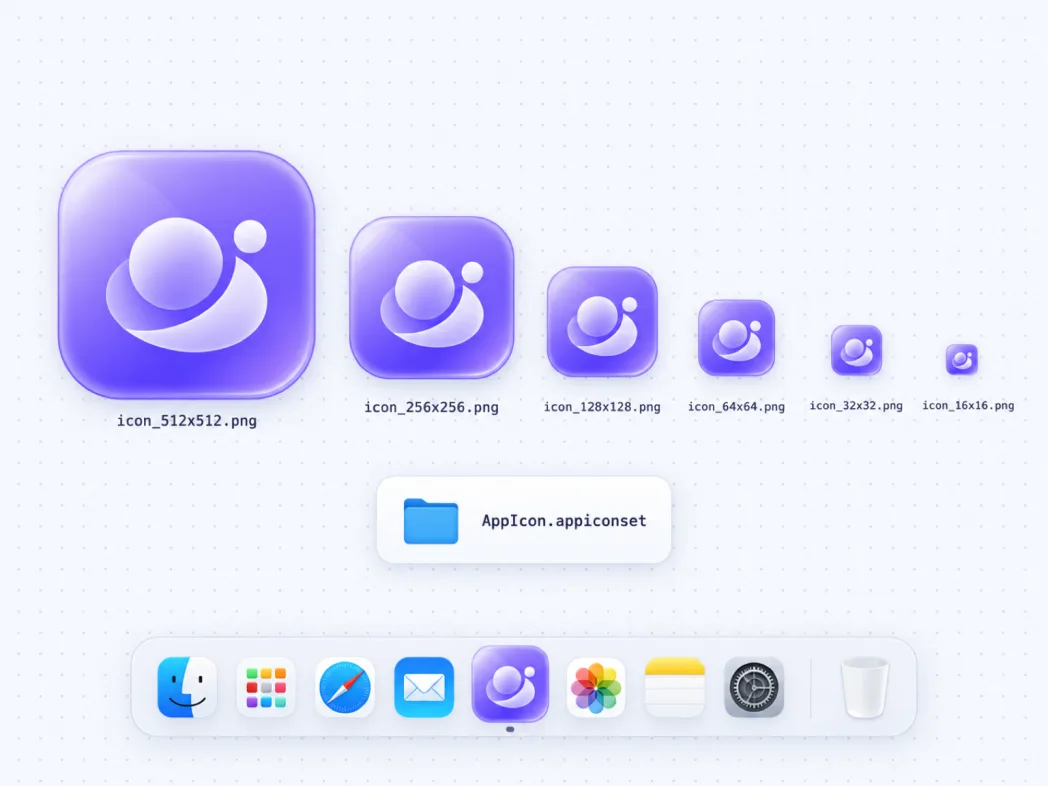
iOS masks corners automatically, macOS does not. The Mac expects the rounded square inside the file, with a corner radius near 22.5% and your content inside safe margins, so the export bakes the shape in instead of leaving it to the system.
The Dock
The Dock renders between 32 and 128 pt depending on user size settings, in retina up to 256 px. Magnification animates the icon past 128 pt for a moment, which is why edges and gradients need to survive scaling in both directions.
Finder, Spotlight and the switcher
Finder icon views, list sidebars, Spotlight results and the cmd-Tab switcher all pull from the same set, mostly at 16 to 64 px. These cramped contexts are where thin strokes and small text collapse first.
macOS 26 layered looks
macOS 26 adds dark, tinted and clear Liquid Glass appearances authored as layers in Apple's Icon Composer. Generate your base mark here first, then carry it into Composer for the layered treatments.
Where the Mac app icon appears in the wild
The Dock is only the loudest stop. The same rounded square sits in Finder windows and desktop stacks, the cmd-Tab switcher, Spotlight results, Mission Control, Launchpad and the Mac App Store listing beside the app name. Design for the smallest of these first: a mark that reads in a 16 px Finder sidebar row holds up everywhere else on the Mac.
Three Ways to Get a macOS App Icon
An AI generator, Apple's Icon Composer with a Figma mac template and a freelance designer all end at the same asset catalog. They differ in where you start and how much of the artwork exists before you begin.
| AI icon generator | Icon Composer and Figma templates | Hiring a designer | |
|---|---|---|---|
| Starting point | A sentence describing the mark | Finished artwork you already have | A brief and a call |
| Creates the artwork | Yes, every icon drawn for your prompt | No, it layers and rescales what you supply | Yes, within the brief |
| Time to a finished icon | Under a minute per concept | Minutes, once the artwork exists | Days per round |
| Cost | Credits or subscription, free to start | Free tools on top of a design stack | Hundreds per project |
| Full macOS size set | Ten-entry appiconset with Contents.json exported to spec | You assemble the size grid from the template yourself | Handled if the brief includes exports |
| macOS 26 layered looks | Base mark generated here, layers assembled in Icon Composer | Built in, that is the tool's purpose | Possible, with skill and iterations |
Comparison of typical workflows, verified as of 2026.
What the Generator Handles for You
Everything between the first prompt and files the Xcode asset catalog accepts.
One 1024px master
Generate once at full resolution; every catalog entry downscales from it cleanly.
The full macOS size family
Ten PNG entries from 16 to 1024 px at 1x and 2x, exported together with the Contents.json.
Rounded square, baked in
The export applies the macOS shape with the corner radius Apple's template uses, so the file arrives Dock-ready.
Small-size previews
Check the mark at 128, 64 and 32 px while you iterate, those are the sizes where Mac icons live.
Variants until it reads small
Regenerate the same concept to test weights and colors until the silhouette survives the Finder sidebar.
Every style for one mark
Flat, glass, 3D, minimalist and more presets, tuned for icon-scale silhouettes.
Mac Icon Styles, from Flat to Glass
Style decides whether the mark survives the shrink from a 1024 px master to a 16 px catalog entry. Flat and minimalist marks hold small sizes most reliably, glass presets echo the macOS 26 material without the layered file, and 3D presets add depth once the silhouette stays single and bold. Compare directions at icon scale in the icon style gallery: the minimalist, glassy and 3D pages show each style on real marks.
Design a Mac Icon That Survives the Dock
Most Mac icon rework traces back to four habits. Draw the rounded square yourself with a corner radius near 22.5%, because macOS applies no mask of its own. Keep content inside comfortable margins so Finder backdrops and dark wallpapers do not crowd the mark. Hold strokes thick, since hairlines vanish at 32 px. And test against light and dark wallpapers, because Dock and desktop colors vary per user and your icon rides on all of them.
Where the Workflow Fits
One master from the generator, exported for every surface that shows a small rounded square beside your Mac app's name.
First Mac App Store launch
Ship the 1024px marketing icon with the listing and drop the appiconset into Xcode once.
Electron and Tauri packaging
Take the 1024 px PNG into your build config, or wrap the size set into an .icns with iconutil when the packager wants one file.
Indie tool suites
Reuse one prompt base to keep a family of Mac utilities visually consistent, then branch per app on the canvas.
Shipping the iPhone and iPad version
The 1024px no-alpha master and the Xcode asset set for iOS, cut from the same square.
Launching on Google Play too
The 512x512 Play asset and the mipmap set from the same master, spec-checked for Play Console.
PNG masters for every channel
One PNG export pass for the App Store, Play, web favicons and press kits.
Related Tools
Blog
Further Reading
Longer reads on icon design, store specs and workflows.
macOS App Icon FAQ
Sizes, asset catalogs, .icns files and the questions people ask before shipping a Mac icon.
What size is a macOS app icon?
The Xcode asset catalog wants ten PNG entries: 16, 32, 64, 128, 256, 512 and 1024 px covering 1x and 2x, bound by a Contents.json. The Mac App Store listing takes one 1024x1024 marketing icon. Generate the 1024 master here and export the whole set in one pass.
Can I use a single 1024x1024 icon for macOS like iOS?
No. The single-size workflow that lets iOS derive every size from one 1024 file does not apply to Mac asset catalogs: macOS needs each entry in the set. Export builds the ten-entry appiconset for you, so the manual grid work disappears anyway.
Does macOS round the corners of my icon automatically?
No. iOS applies its own superellipse mask, but macOS expects the rounded square inside the artwork itself, with a corner radius near 22.5%. The export bakes the shape in, and the full-square master stays available if you need it.
How do I make an .icns file?
Collect the size set into a folder named AppIcon.iconset, then run iconutil -c icns AppIcon.iconset. Xcode projects do not need this step, since the asset catalog compiles itself; Electron, Tauri and setIcon-based apps usually do.
How do I add the icon in Xcode?
Drag the exported AppIcon.appiconset into your Assets.xcassets, open the target's General tab and confirm the AppIcon set is selected. Xcode validates all ten entries at build time and writes the compiled icon into the bundle.
Why does my icon look blurry in the Dock?
Two usual causes: a master below 1024px being upscaled, or a missing size entry so the system stretches a neighbor. Generate at 1024 and export the complete set, and the Dock always has exact pixels to render.
How do I generate a Mac app icon for free?
The generator above starts with free credits: describe the mark, generate the 1024 master, and export the asset set before paying anything. Further generations use credits, and every plan includes all export formats.
What shape should a Mac app icon be?
A rounded square with the corner radius Apple's macOS template uses, roughly 22.5%. Keep the subject inside comfortable margins, avoid text, and give the mark a silhouette that survives 32 px in Finder sidebars.
Can I use the generated icon in a published app?
Yes. You keep full commercial rights to every icon you generate, subject to the terms of service, including icons shipped on the Mac App Store.
Do I need a different icon for the Mac App Store listing?
No. App Store Connect takes a 1024x1024 marketing icon cut from the same master your catalog set uses. Upload it with the listing and the store derives its own display sizes.
Generate Your macOS App Icon Set
Describe the mark once, export the ten-entry appiconset and the 1024px store upload from one master, and submit to App Store Connect the same day.